Windows · offline · one-time purchase

Know what you own, and who walked off with it.

Asset Register keeps a record of your tools, equipment and stock: which van or shelf it lives on, how many you have, what it cost, and who signed it out. It prints QR labels for the things that never had a barcode. It makes no network requests at all, and it costs 15 dollars once.

One payment. No subscription, no account, no per-item pricing, no renewal.

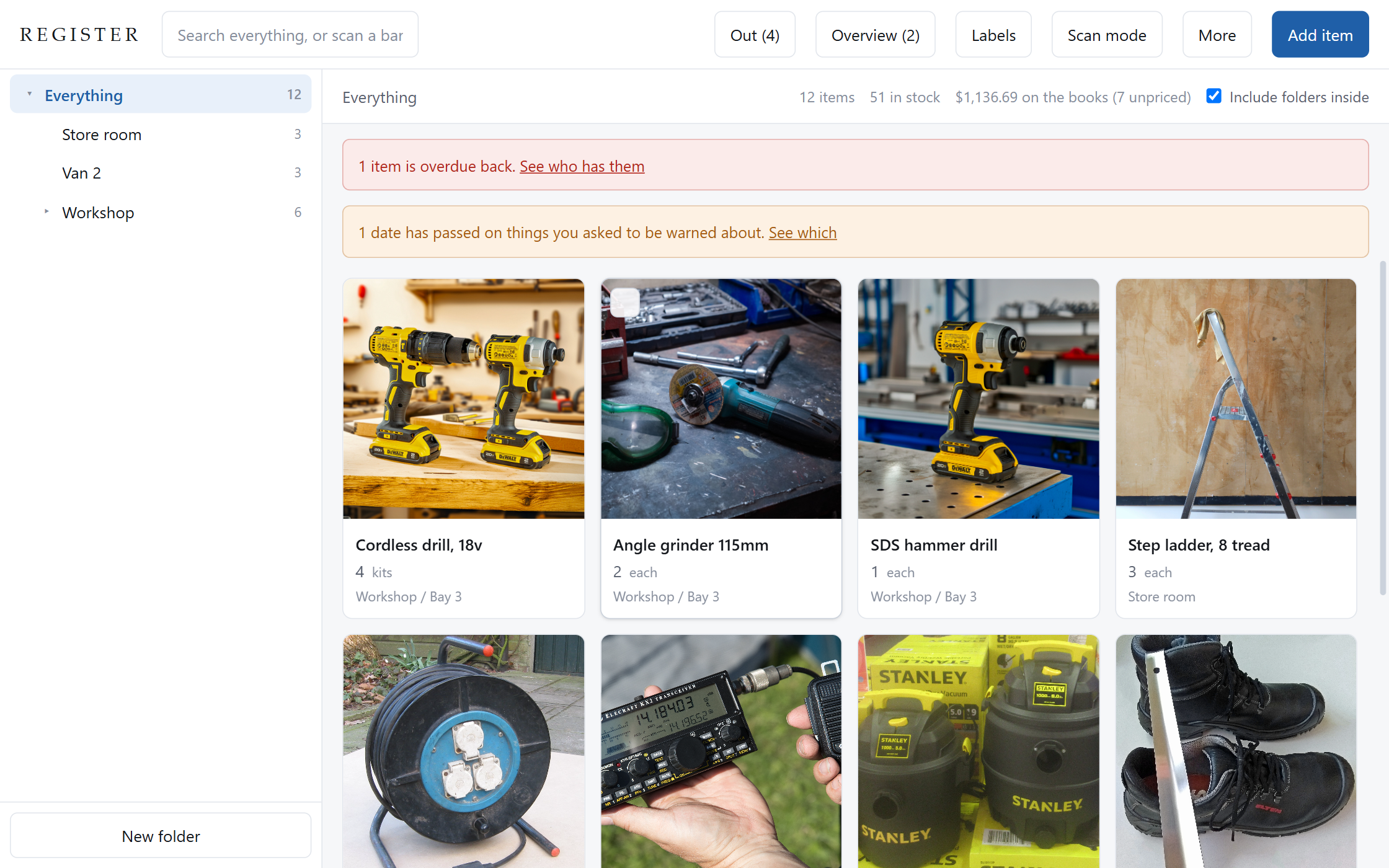
The Asset Register main window: a folder tree of Store room, Van 2 and Workshop on the left, a grid of item cards with quantities and locations, and a red banner saying one item is overdue back.
Everything you own, in the place you keep it. Folders are locations, so items move between them the way the real thing does. The banner at the top is the question a tool register exists to answer.
Paid once

Fifteen dollars. Not per month, not per item, not per user. What you own does not change what you pay.

No network, ever

Not "offline first, syncs later". There is no code in it that opens a connection. Pull the cable out and nothing changes.

Your disk, your file

No account and nothing to sync. Everything is encrypted on your own machine, and the CSV export is complete rather than a courtesy.

What it does

The whole job, not a demo of it

Built against what people actually complain about in the tools that charge monthly for this.
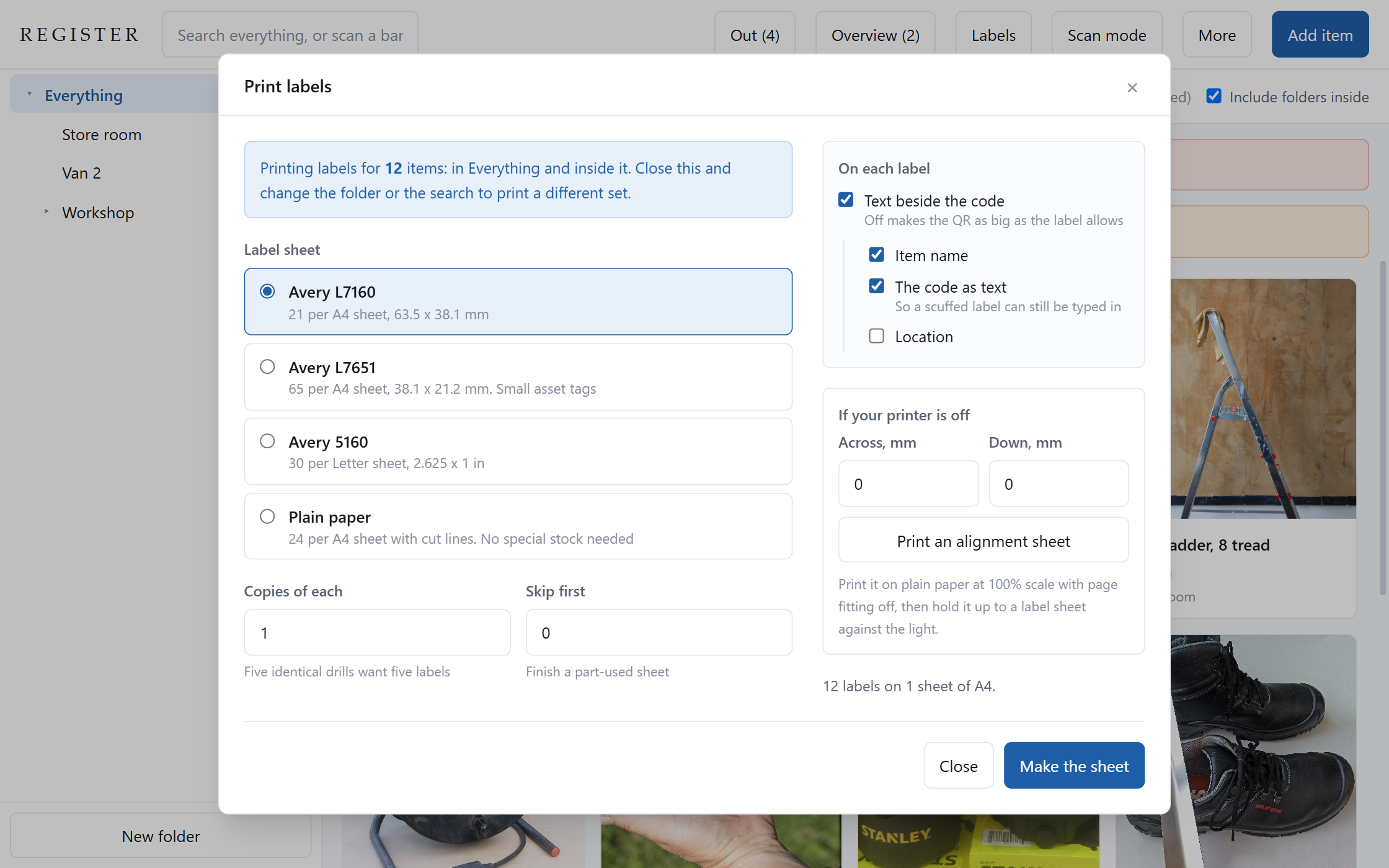
The print labels panel, offering Avery L7160, L7651, 5160 and plain paper layouts, with options for what appears on each label and a button to print an alignment sheet.
Labels for the things that never had a barcode. Most of a workshop has nothing to scan. Printing a label gives the item a code and saves it, so the sticker and the register always agree. Start partway into a part-used sheet, and print an alignment sheet on plain paper before you spend a sheet of labels.
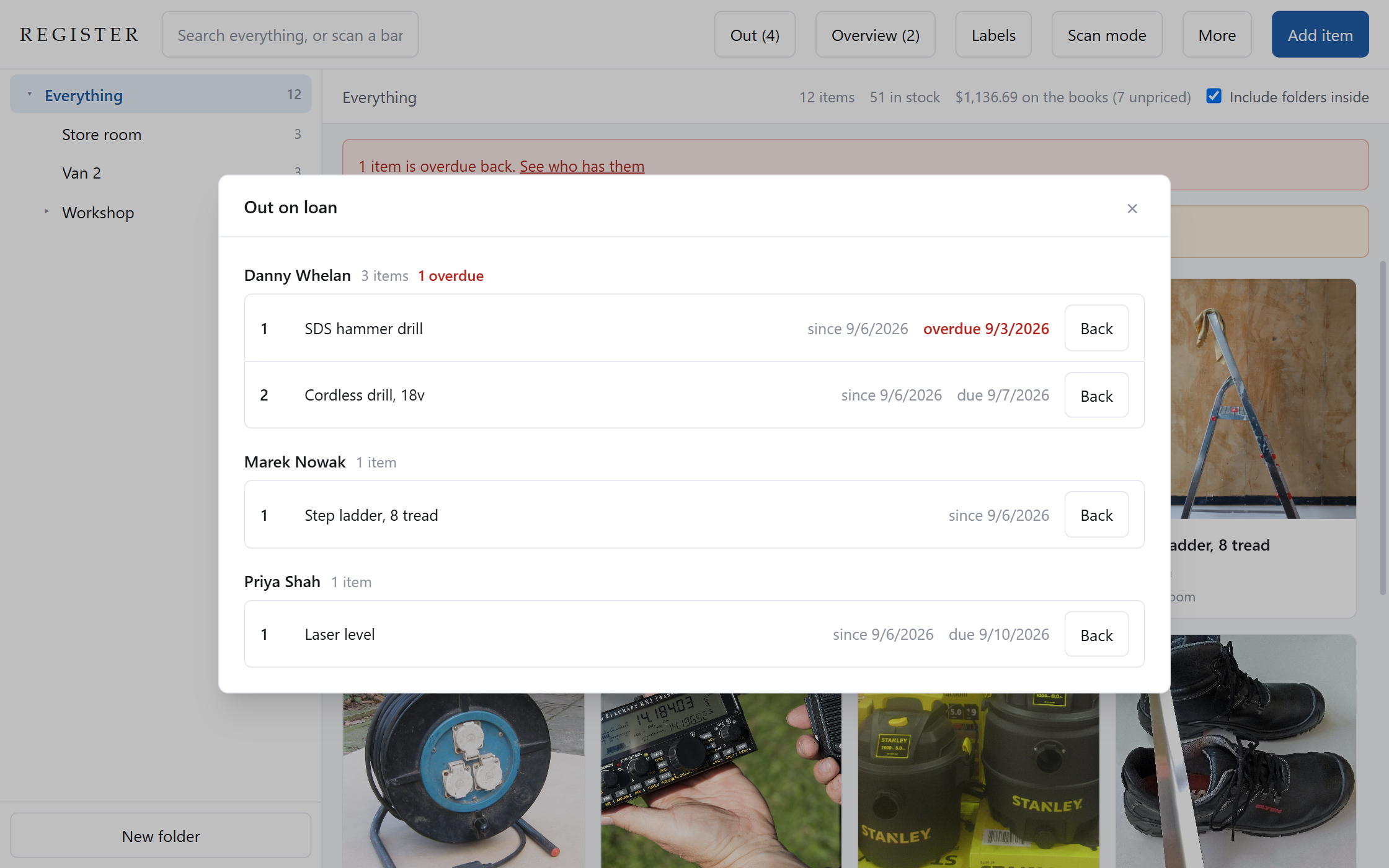
The out on loan panel, grouped by person: Danny Whelan with three items and one marked overdue, Marek Nowak with a step ladder, and Priya Shah with a laser level.
Who has it, and since when. Own five drills and two go out, and you still own five. Custody is tracked per loan rather than as a flag on the item, so a partial return leaves the rest against the same person.
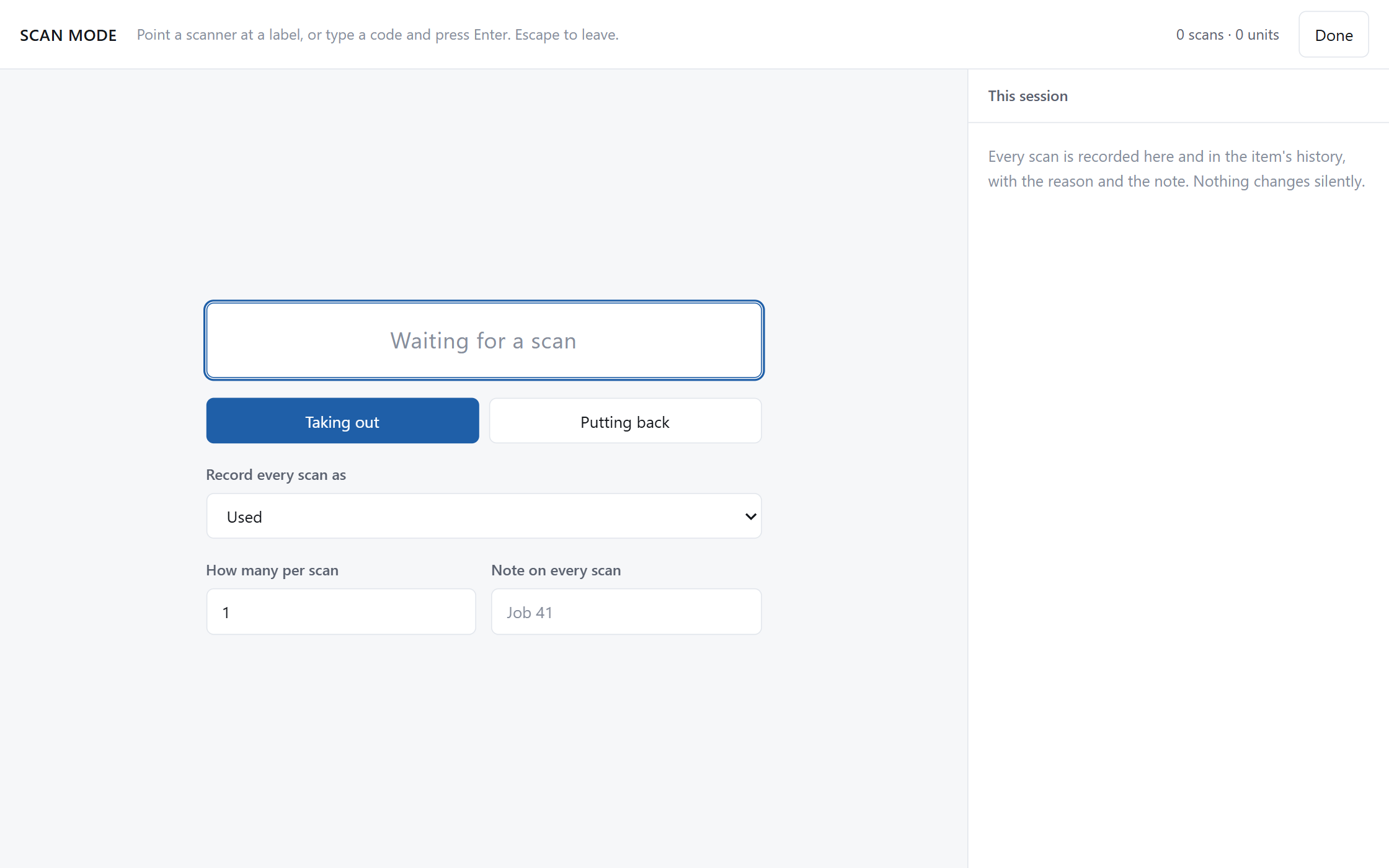
Scan mode: a single large input box waiting for a barcode, with a running log of scans beside it and a toggle between taking out and putting back.
A scan is an action, not a search. Any USB or Bluetooth scanner presents itself as a keyboard, including a phone running a scanner app. The count moves as you scan, with a reason recorded against every one.
Compare

Against a spreadsheet, and against the monthly bill

Two rows here go against us. They are in the table on purpose, because finding them out after you pay is worse.

Feature A spreadsheet Cloud asset apps Asset Register
What three years costsNothingAbout $1,760 at $49 a month$15, once
Price stays put as your inventory growsYesNoYes
Photographs on every itemPartlyAwkward and it bloats the filePartlyUsually capped by planYes
Who has the drillNoYesYes
Printable QR labelsNoYesYes
Barcode scanningNoYesYes
Works with the internet offYesNoYes
Still yours if you stop payingYesNoYes
A phone app for the yardNoYesNoScanners work, the app is desktop only
Several people in it at oncePartlyYesNoOne machine, one operator
Limits

What it does not do

Stated here rather than discovered later. Every product under this brand carries this section.

  • There is no phone app. Barcode scanners work, including a phone running a scanner app over Bluetooth, but the register itself runs on the desktop. If your crew needs to update stock from the yard, this is the wrong tool.
  • One person at a time, on one machine. There is no shared access and no syncing between computers, because both would need a server.
  • Windows only. There is no Mac or Linux build.
  • It does not calculate depreciation, and it does not produce accounts. It records what you own and what it cost. Your accountant does the rest.
  • It is not a replacement for a cloud system used by a field team. It is a register for one person who needs a record: a workshop, a church, a small lab, a solo contractor, an office manager producing the annual list for insurance or audit.
  • The backup passphrase cannot be recovered. Nobody has a copy, including me, because there is no server that could hold one.
Price

Fifteen dollars, and then nothing

The comparison to make is not against other software you buy. It is against the bill that arrives every month for the rest of the time you use it.

$15One payment. Windows installer and a portable version.
  • Every feature on this page
  • Unlimited items, folders, photographs and labels
  • Free updates within version 1
  • No account, no licence server, no activation
Get Asset Register

Updates within version 1 are free. If there is ever a version 2 it will be a new purchase, said here rather than discovered later. That is the honest counterweight to a one-time price: a perpetual licence with unlimited obligations is how software bought once dies.

Questions

The things worth asking first

Does it really never touch the network?
Yes, and it is checkable rather than a promise. There is no networking code in the application. The window that shows the interface is blocked from making requests at all, and there is no account, no licence check and no telemetry to send anything to.
How do I get my existing spreadsheet in?
Import a CSV. It matches your column names against the common ones, tells you which columns it could not place, and offers to turn those into custom fields rather than silently dropping them. Folders named in the file are created and nested for you.
What happens to my data if you disappear?
Nothing. It is on your disk in a file you own, the app keeps working because it never needed me, and the CSV export takes everything out in a format any other tool will read.
Do I need a special barcode scanner?
No. Almost every scanner, including a 20 dollar USB one and a phone running a Bluetooth scanner app, behaves like a keyboard: it types the code and presses enter. Scan mode is built for that, so it works with whatever you already have.
What if the things I own have no barcode on them?
Most of a workshop has none. Print labels for them and the register issues each one a code, saves it, and puts it on the sticker as a QR and as text. Codes already in use are never changed, so labels you stuck on last year keep working.
Can I keep the backup in Dropbox or Google Drive?
Yes, and that is the intended way to do it. The app never talks to them. It writes an encrypted archive into a folder you choose, and if that folder happens to be inside your Dropbox or Drive, your own sync client carries it. What lands there is unreadable without your passphrase. The live register itself should not sit in a synced folder, and the app warns you if you try, because a sync client copying the file while the app has it open can corrupt it.
Is my data encrypted?
Yes, records and photographs both, with a key held by the Windows credential store so it opens on your machine without asking you anything. It is not mentioned anywhere in the app because it is not the point of the product. Nobody setting up a tool register wants to choose a threat model.
Windows says the publisher is unknown. Is that a problem?
It means the installer is not code signed. A certificate costs several hundred dollars a year and, since Microsoft changed how reputation is built, no longer removes that warning for a new publisher anyway. The SHA-256 checksums for both files are in the footer of this page so you can verify what you downloaded is what I built.